Where do I access my WireGuard configs?
Winder SFeb 25, 2026

Once you have logged into your account on our website, you can download your WireGuard configs here: https://windscribe.com/myaccount#configgenerator-wireguard
WireGuard configs are only available to users with paid accounts. If you have a Full Pro account, you will have access to WireGuard configs for all locations.
If you have a custom Build-A-Plan account, you will only have access to WireGuard configs for your paid locations.
Head to the generator page, and ensure WireGuard is selected from the Protocol Selection area
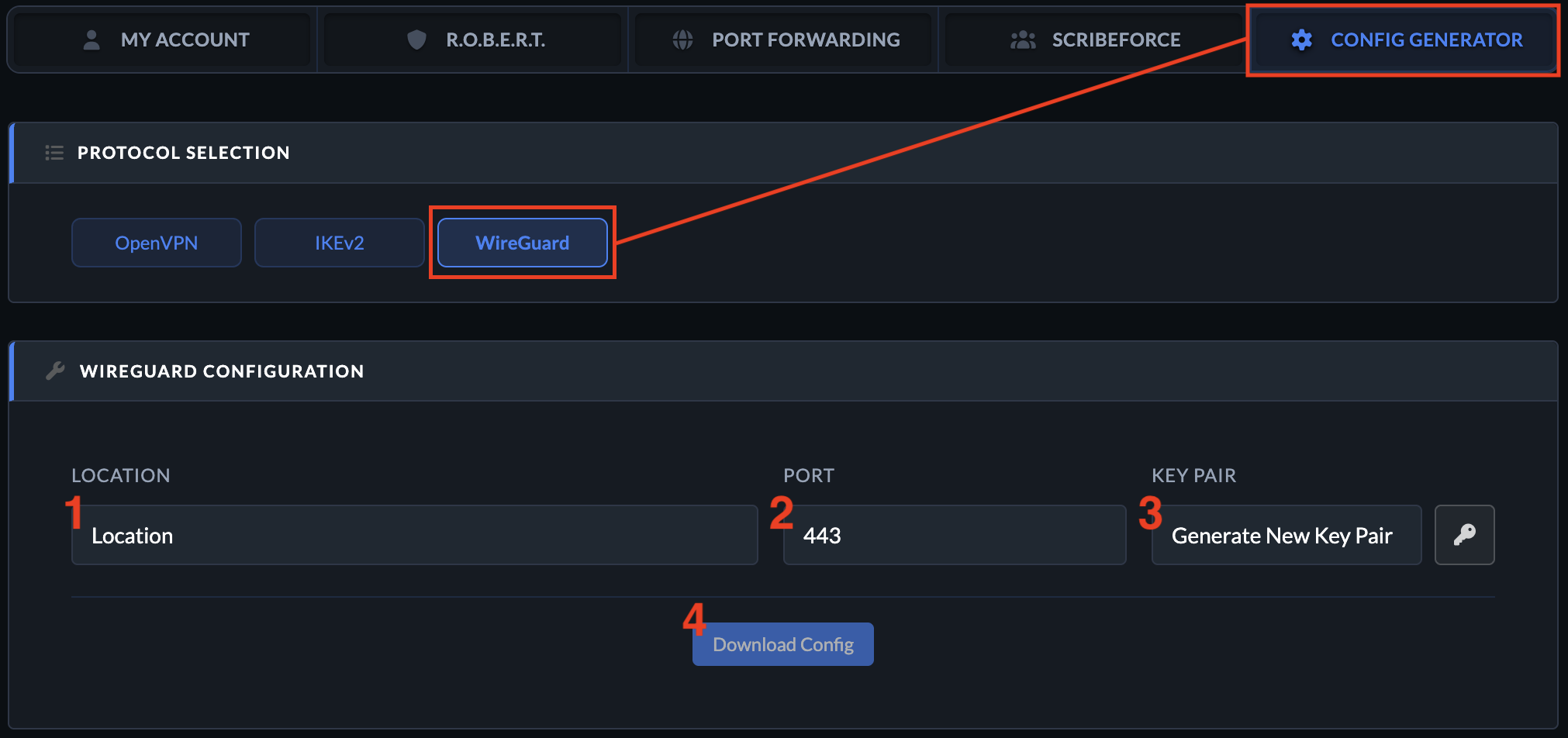
- To get the config, first select the Location you want to connect to.
- Then choose a Port (use 443 if you're unsure).
- Now select New Key Pair (or use an existing key pair if you have them).
- And finally, press Download Config to get the WireGuard configuration file. You can open this file in a text editor to get all the specific details.
Get in touch
Contact Support

Windscribe
Apps